victor cartelle
Campaign:
/
Vc 1
Latitude: 52°34'31.6"
Longitude: 3°37'8"
Vc 2
Latitude: 52°34'32"
Longitude: 3°37'32.6"
Vc 3
Latitude: 52°33'40.5"
Longitude: 3°37'34.7"
Vc18
Latitude: 52°37'39.4"
Longitude: 3°20'29.3"
Vc19
Latitude: 52°37'39.8"
Longitude: 3°20'45.9"
Vc20
Latitude: 52°37'40.1"
Longitude: 3°21'1.2"
Vc21
Latitude: 52°37'40.2"
Longitude: 3°21'5.8"
Vc22
Latitude: 52°37'40.2"
Longitude: 3°21'8.3"
Vc23
Latitude: 52°37'39.4"
Longitude: 3°21'37.3"
Vc24
Latitude: 52°36'5.6"
Longitude: 3°21'8"
Vc25
Latitude: 52°34'55.1"
Longitude: 3°21'27.2"
Vc26
Latitude: 52°35'1.3"
Longitude: 3°30'24.5"
Vc27
Latitude: 52°35'1.9"
Longitude: 3°30'46.2"
Vc28
Latitude: 52°24'47.4"
Longitude: 3°34'18.3"
Vc29
Latitude: 52°28'56.1"
Longitude: 3°9'0.5"
Vc30
Latitude: 52°28'56.8"
Longitude: 3°9'29.4"
Vc31
Latitude: 52°32'11.4"
Longitude: 3°16'3.2"
Vc32
Latitude: 52°32'45.4"
Longitude: 3°19'34.1"
Vc33
Latitude: 52°31'11.3"
Longitude: 3°16'51.9"
Vc34
Latitude: 52°31'11.5"
Longitude: 3°17'0.6"
Vc35
Latitude: 52°30'53"
Longitude: 3°17'15.7"
Vc36
Latitude: 52°31'0"
Longitude: 3°28'19.5"
Vc 4
Latitude: 52°37'7.6"
Longitude: 3°36'6.6"
Vc 5
Latitude: 52°34'33.7"
Longitude: 3°36'25.9"
Vc 6
Latitude: 52°36'24.7"
Longitude: 3°35'55"
Vc 7
Latitude: 52°36'9.2"
Longitude: 3°36'24"
Vc 8
Latitude: 52°42'24.2"
Longitude: 3°20'10.3"
Vc 9
Latitude: 52°42'21.7"
Longitude: 3°21'2.9"
Vc10
Latitude: 52°42'11.9"
Longitude: 3°20'58.9"
Vc11
Latitude: 52°37'56.1"
Longitude: 3°21'5.2"
Vc12
Latitude: 52°34'9.9"
Longitude: 3°21'8.8"
Vc13
Latitude: 52°42'21.9"
Longitude: 3°21'24.8"
Vc14
Latitude: 52°42'21.9"
Longitude: 3°21'27.9"
Vc15
Latitude: 52°42'21.7"
Longitude: 3°21'50.1"
Vc16
Latitude: 52°42'21.5"
Longitude: 3°22'11.3"
Vc17
Latitude: 52°42'21.2"
Longitude: 3°22'26"
ID
Name
Action
Station
Start Time
Start Lat
Start Long
Stop Time
Stop Lat
Stop Long
Note
Actions
Retrieving Underway
Data
Underway data is now available through the Lifewatch Data
Explorer . Here you can view and download data.
Data is available in 4 different sample periods. 1 day, 1 hour, 10
minutes, 1 minute. Press the underway data
button and select a sample size. It will take you directly to the
explorer.
Underway data
Data Explorer Manual
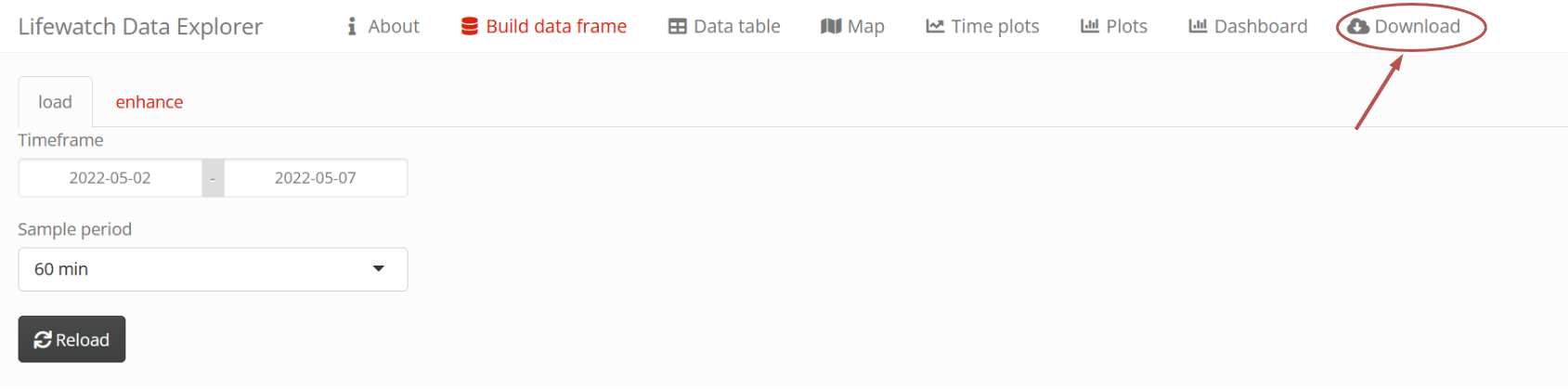
To retrieve data in the Data Explorer go to the Download tab.
Press the To File button to start the download.